


Turn a €10 spare keyboard into your soundboard and stream deck. 80+ keys for sounds, apps, links and OBS scenes — fires instantly, in-game, no drivers.
GET FREE BETA ACCESSWindows 10/11 only

Plug in a spare keyboard, drag sounds onto the keys — done. Every key fires instantly: in-game, in Discord, on stream. Keys can launch apps, open links and switch OBS scenes too. And when clips aren't enough, build your own in the Mixer or play them on the built-in Piano.
Timing is the joke. A sound that fires two seconds late kills the moment — SoundLord fires on key-down, even after hours idle. OBS sits on the same keys: switch scenes (and back on release), take screenshots, mute, record. No alt-tab mid-game.
Your main keyboard stays yours. SoundLord listens only to the keyboard you pick — the second one becomes your soundboard and stream deck, the first keeps gaming and typing without losing a single key. Any wired or wireless USB keyboard. No second board? Run it on your main one with shortcuts.
Every key, its own sound. Volume, speed, play mode, hold-to-loop, cut & fade and 9 effects — set per key. Roll the mouse wheel over the board and everything playing bends in pitch live, vinyl style.
Your stream jingle in five minutes. Drop sounds on a 10-lane beat grid — or flip on Use Board Sounds and play them in live — record your mic or the piano on top, export the loop as one sound and put it back on a key. Intro jingles, hype loops, donation sounds. No DAW.
One key, up to four jobs. A sound, an app, a link, a panic stop — or all of them at once. Your keyboard becomes a real stream deck:
Plug in, pick the keyboard, done — no drivers, no admin rights. Only for Discord you add a free virtual audio cable.
Press a key after four idle hours and it fires like the first time — a silent heartbeat keeps the audio pipeline warm.
Barely there while you game. Two engine modes and an adjustable voice pool fit SoundLord to any PC, from gaming rig to old laptop.
10 animated backgrounds, 24 color themes, light & dark — the whole app recolors live.
Don't build — clone. Meme packs to full streamer setups, onto a profile in one click, with panic, ducking and volume keys already in place.
45 real instruments on your letter keys — grand piano to 808. Play live, or record straight into the Mixer.
Download the installer, run it, and SoundLord starts automatically. No admin rights needed.
Plug in a second USB keyboard. Open Settings and select it as your soundboard device — or use your main keyboard with shortcuts.
Drag audio files onto keys or use the sound library. Press a key on your soundboard keyboard and hear it instantly. For a quicker start we recommend cloning a ready-made soundboard from Templates.
SoundLord runs on Windows. Drop the link in your inbox and it is waiting the moment you sit down at your desk.
Free trial — no payment details. Ends in
Free trial with the full core feature set, until the beta closes. Start it inside the app — no payment details needed.
Beta price. Rises to €20 after beta. No subscription, ever.
Requires a SoundLord account. Billed monthly, cancel anytime.
Won a code in a Twitch giveaway or event? Redeem it here for a free Pro license.
Every tab explained — what it does, what you can do with it, and the tricks that aren't obvious. Jump straight to a topic:
The Board is a live view of your keyboard — every key is a slot for a sound, an app, a link, a folder or an OBS action. Assign, tune and trigger everything from one screen, watch every sound play out live on the keys, and switch whole boards via profiles mid-stream.
Every key carries its own volume and speed slider right on the cap — tune each sound without opening a menu. The master volume bar below the board scales everything at once. Handy when one meme is twice as loud as the rest.
Click + on any key to pick a sound from your library, or drag audio files straight from Explorer onto an empty key. Drag sounds between keys to move them, drop on an occupied key to swap, hold Ctrl to copy. Rearranging a whole board takes a minute, not an evening.
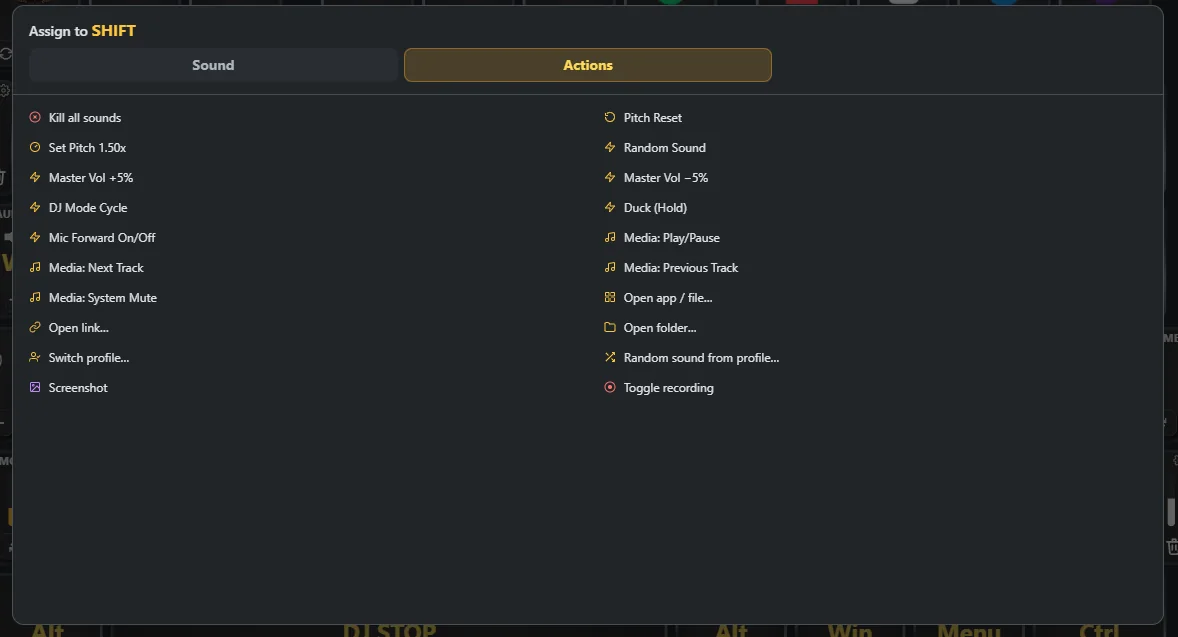
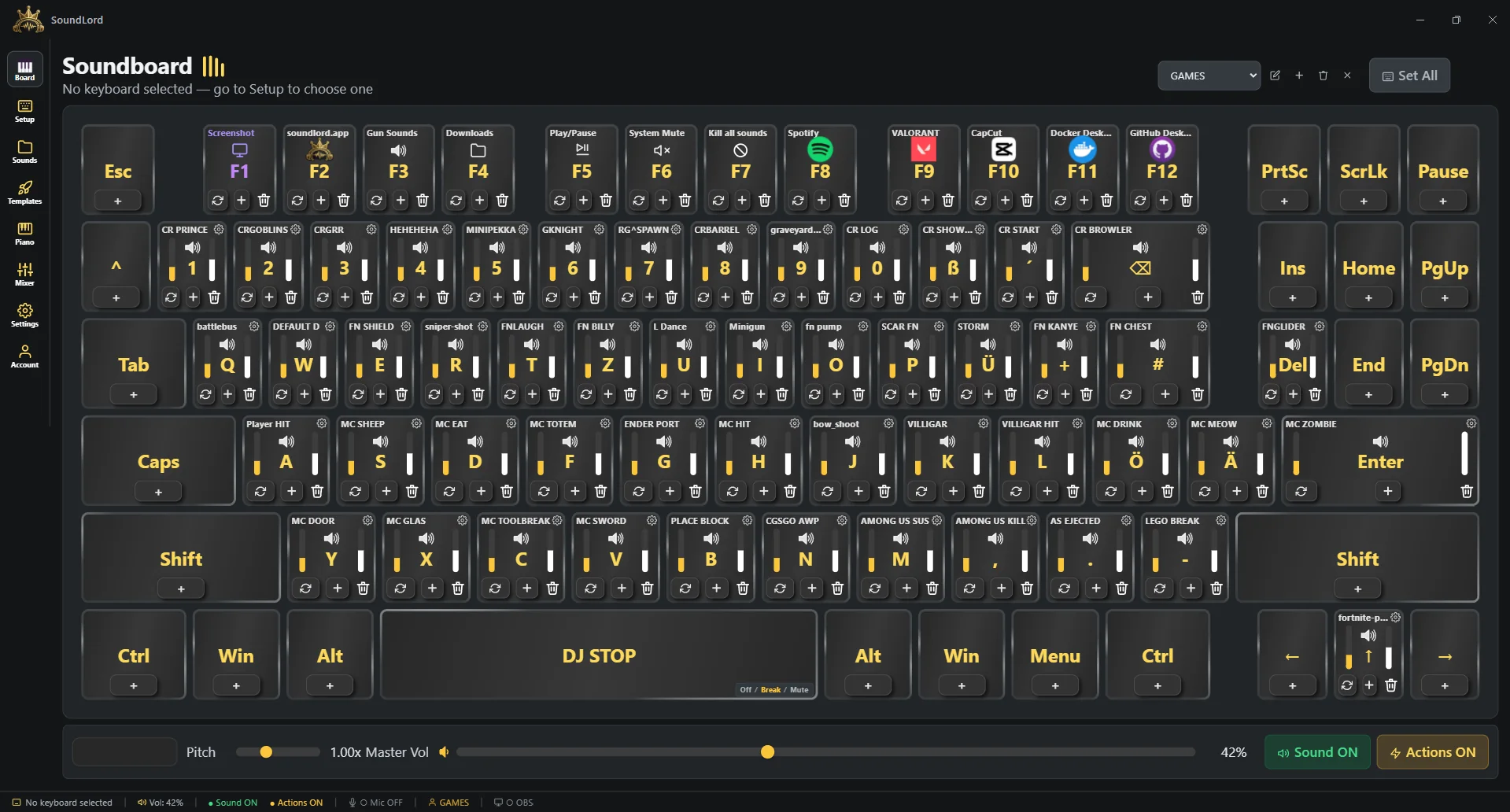
Up to 30 profiles hold completely separate boards — switch them with hotkeys mid-stream. Set All applies one setting to every key at once instead of clicking through 80 keys. Perfect for a horror-night board next to your everyday one.
Keys don't have to play audio — bind an action instead (or on top of a sound): launch any app (the key shows the app's real icon), open a link (shows the site's favicon), open a folder, switch profiles, play a random sound, send global media keys (play/pause, next, prev, system mute — controls Spotify & co.), nudge master volume ±5% or duck everything to 30% while held. Streamdeck behavior, no extra hardware.
Keys can trigger OBS instead of audio: switch scenes (with auto-switch-back on key release), take screenshots, mute your audio, toggle recording — all without leaving the game. Hold a key for your “BRB” scene, let go and you're back.
The spacebar is one giant panic key with three modes: Break pauses everything, Mute silences without stopping, Off gives you the spacebar back as a normal key. A DJ Mode Cycle action flips modes hands-free, and a separate Kill Sounds key stops everything instantly.
Scroll the mouse wheel anywhere on the board and every playing sound bends up or down live, vinyl style — real pitch, not a speed trick. Set Pitch jumps to a stored value (hover + wheel tunes it), Pitch Reset snaps back to 1.00×. Wheel over a single key instead and you nudge just that key's volume — with Shift, its speed.
One key that kills every playing sound instantly — independent of the DJ stop, and it fires even when the board is muted. The setting you hope you never need mid-stream.
A single toggle silences the whole board — from the app or the tray icon, without closing anything. Handy when a call comes in and your chat is feeling creative.
While a sound plays, its key dances: live frequency bars and an animated sound line show exactly what's playing where. The header shows FPS, GPU and CPU load, so you always know what SoundLord costs your stream — spoiler: almost nothing.
Plug in any USB keyboard and it appears here instantly. Select it as your soundboard device and SoundLord captures its keys globally — in-game, in Discord, everywhere — while your main keyboard stays completely untouched.
Every connected keyboard shows up with its hardware ID. Set the filter on your second board and only its keys trigger sounds — your main keyboard types like nothing happened. Chat in Discord while the other board fires sounds.
Raw-input capture works without drivers, without admin rights, without any extra software. Plug in, select, done — works on a locked-down PC too.
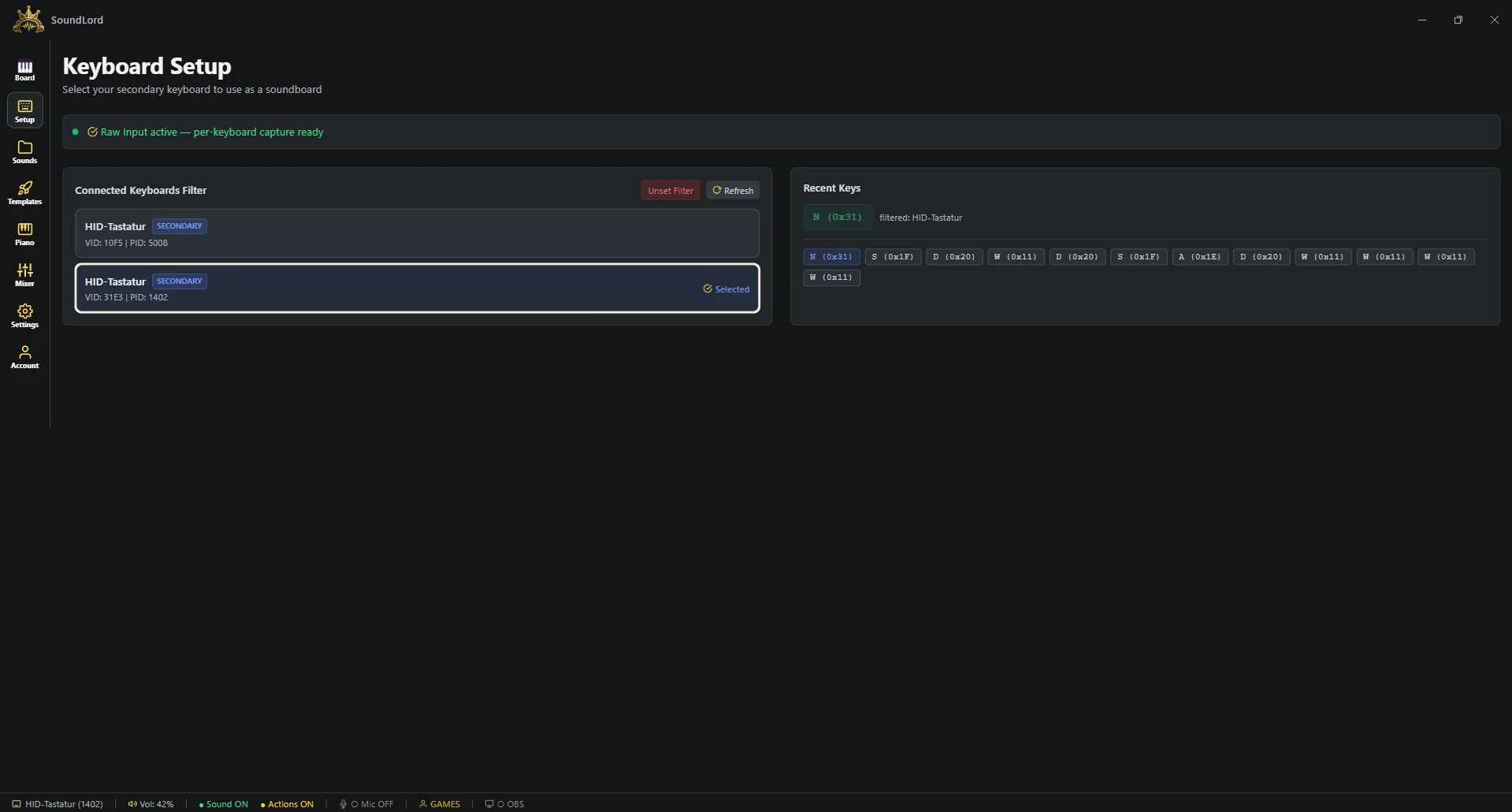
The panel shows every keypress live with its scan code, so you can verify the filter grabs exactly the right device before you go live.
Unset the filter and run the board on your main keyboard with shortcuts instead — every feature works the same.
Every sound you own lives here. Drop files in and they're instantly playable — no conversion, no waiting — and everything you record with your mic lands here too, ready to be dragged onto a key.
Drop MP3, WAV, OGG, FLAC, M4A or WebM files into the library — or a whole folder at once. They're ready to assign the moment they land. Your old soundboard folder moves over in one drag.
Search the whole collection instantly and filter it down — with a library of hundreds, the sound you want is two keystrokes away.
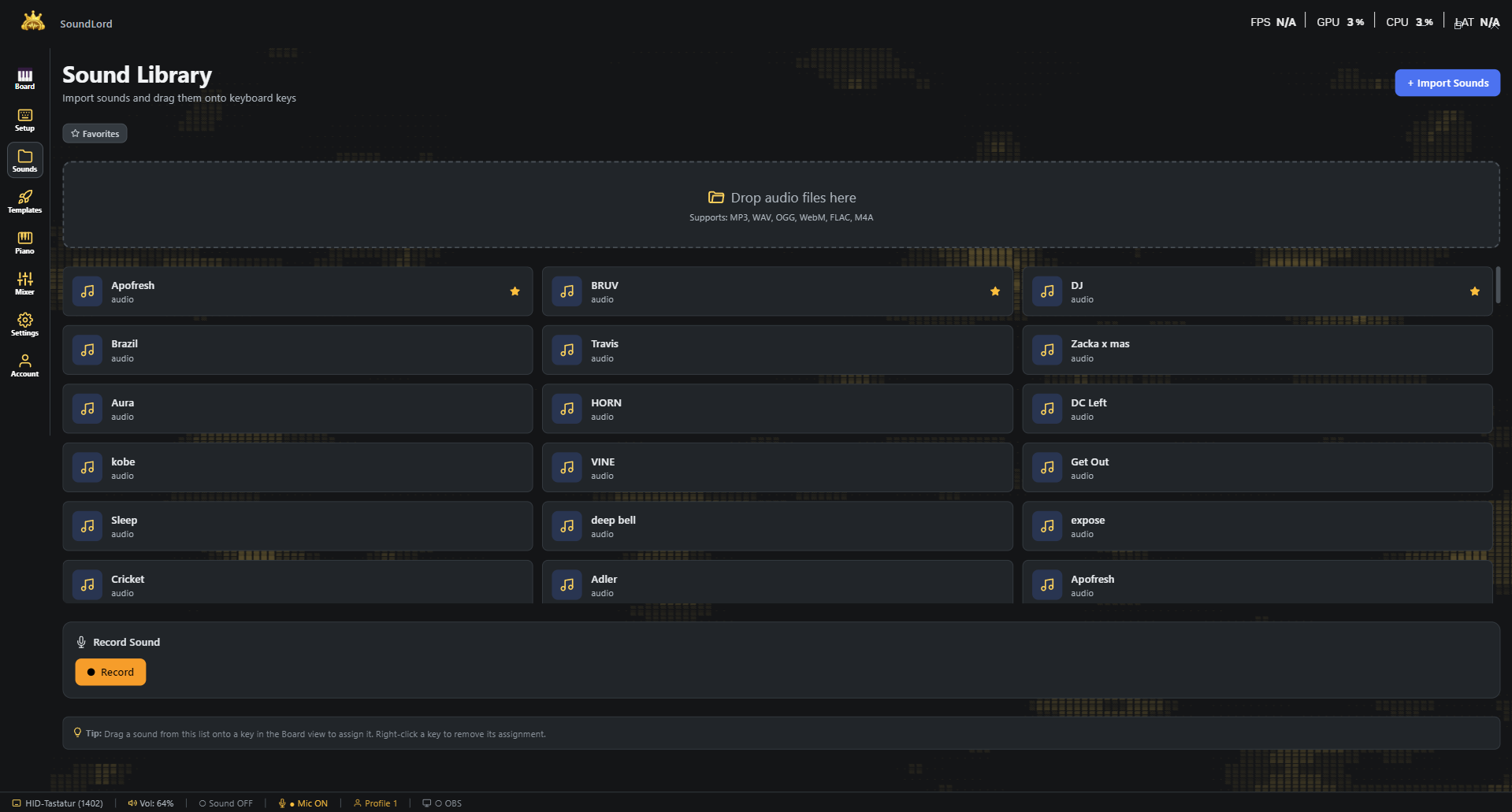
The built-in recorder captures your microphone straight into the library with a live level meter: record a line, hit stop, and it's a sound like any other. Perfect for your own catchphrases.
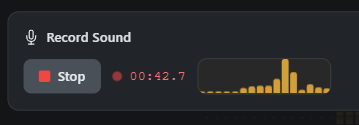
Unlimited local sounds on every plan. Your files stay on your PC — the cloud is optional, never required. A thousand memes cost you nothing but disk space.
Star the sounds you reach for every stream and tag the rest — memes, hype, stingers, whatever your system is. The list follows your tags, not the import order.
Click any entry to hear it right in the library, before it ever touches a key. Preview playback ignores mute and the DJ stop, so you can check a sound mid-stream without it going out.
Clean up in place: rename a sound so you actually find it again, or delete what you never use. Trimming a sound can spin off a copy instead of overwriting it, so variants live next to the original.
Strip dead silence off a recording with one click, and let the automatic BPM detection tell you what tempo a clip runs at — the number you need before it goes into the Mixer.
Open any key's settings and shape exactly how it fires — play behavior, speed, trims and a full per-key effect chain. Every setting lives on the key, so two keys with the same sound can behave completely differently. Pitch is separate: it lives on the board as a live, global bend (see below).
Normal restarts the sound on re-press; Spam stacks plays on top of each other — mash the key and every press fires simultaneously. Stop & Go pauses and resumes long tracks in place.
Keeps the sound looping while the key is held and fades it out on release — with an adjustable fade-out time. Perfect for ambience, sirens and crowd loops.
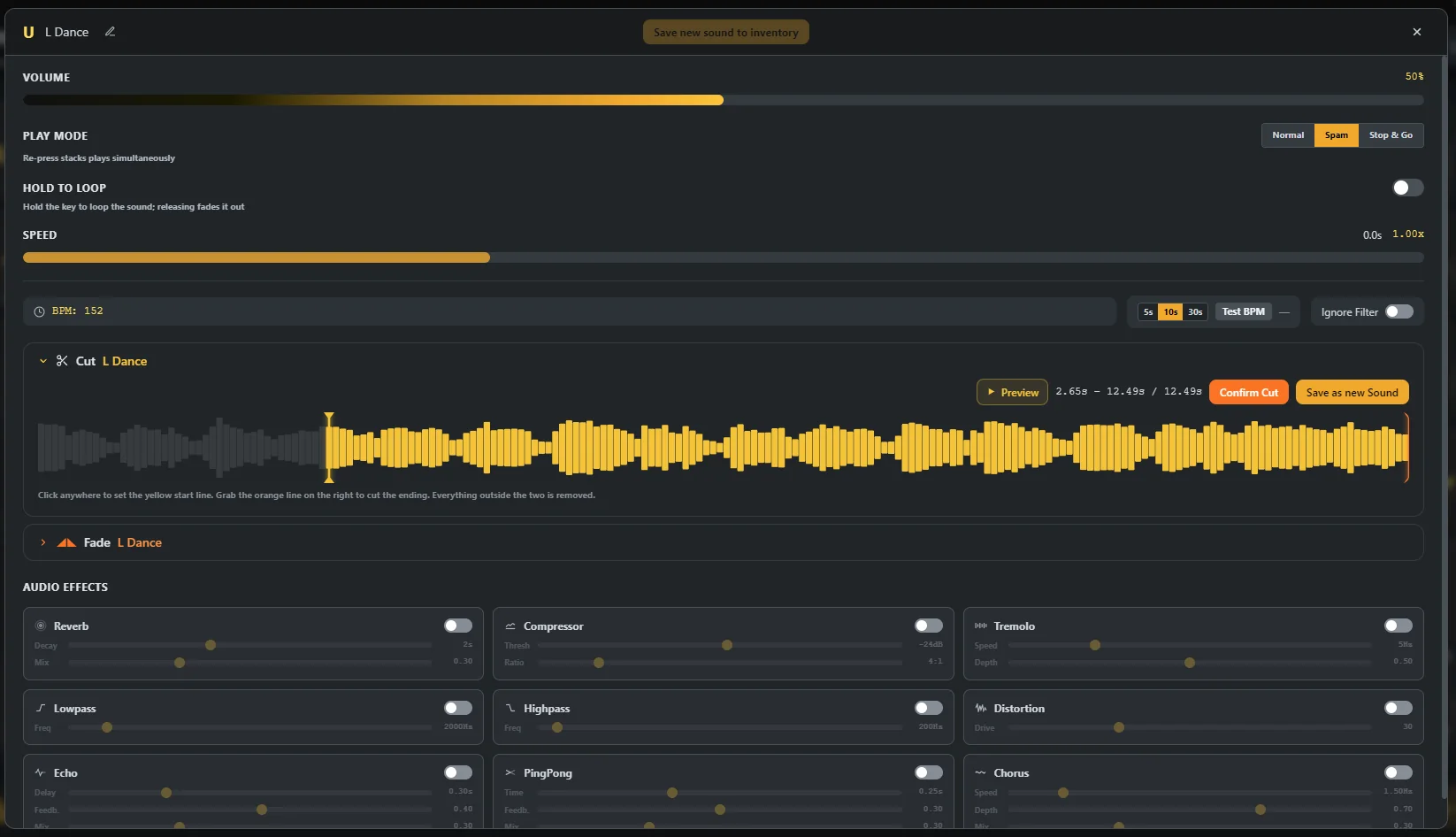
Every key carries its own volume and playback speed from 0.5× to 2×. Two keys can hold the same sound and fire it completely differently — one clean, one chipmunked.
Trim the dead air off the front or chop the tail directly on the waveform — drag the yellow line, confirm, done. Apply it destructively or hit Save as new Sound to keep the original.

Give a sound a soft entrance and a clean tail instead of a hard cut. Both fades are set in seconds and ride along with the playback speed, so a sped-up sound still fades cleanly. Handy for music clips that were cut mid-beat.
Echo, reverb, lowpass, highpass, distortion, compressor, chorus, tremolo and ping-pong delay — each with its own live parameters, per key. Turn one clip into a cave echo, a phone call or a robot.
Made for long tracks: a short press pauses the sound right where it is, the next press carries on. Hold the key to stop and rewind. Background music you can park mid-song.
Volume, speed, fades, loop behavior and the whole effect chain are stored on the key, not on the file. They ride along in the profile ZIP and land identically on your next PC.
Don't start from zero. Templates are complete, hand-built soundboards — meme packs, game sounds, streamer setups — ready to clone. The fastest way from fresh install to a full board is under a minute.
Pick a template, pick a target profile, hit Clone: all sounds download, all keys map themselves. Your board is ready before your coffee is.
Want just one sound from a pack? Download it individually into your library instead of cloning the whole board — top up your own board without taking over someone else's.
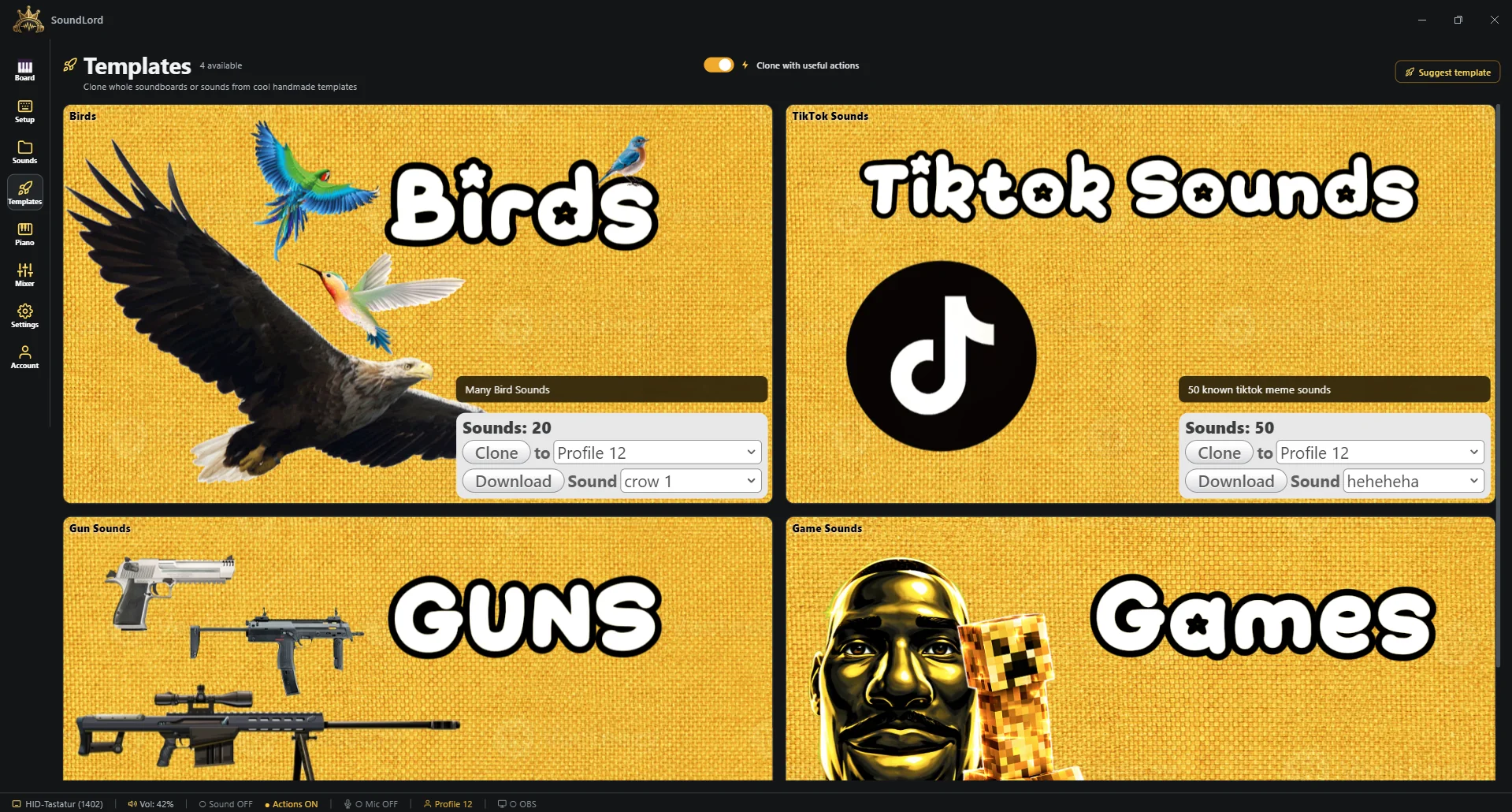
The catalog grows constantly with house-made boards and community uploads — every upload is manually reviewed before it goes live, so no broken or junk packs.
A template never overruns your setup: pick which profile it lands in — a fresh one for the pack, or an existing board you want to top up. Your other profiles stay exactly as they were.
A full three-octave piano played straight on your keyboard, 45 sampled instruments deep. And everything you play can land directly in your Mixer loops — improvise a melody, keep the take.
The letter rows are the white keys, the number row the black ones — three octaves under your fingers, laid out as one continuous keyboard instead of stacked manuals.
From grand piano, organ and harpsichord to strings, brass, sax, tubular bells and 808s — one click switches the whole keyboard over.
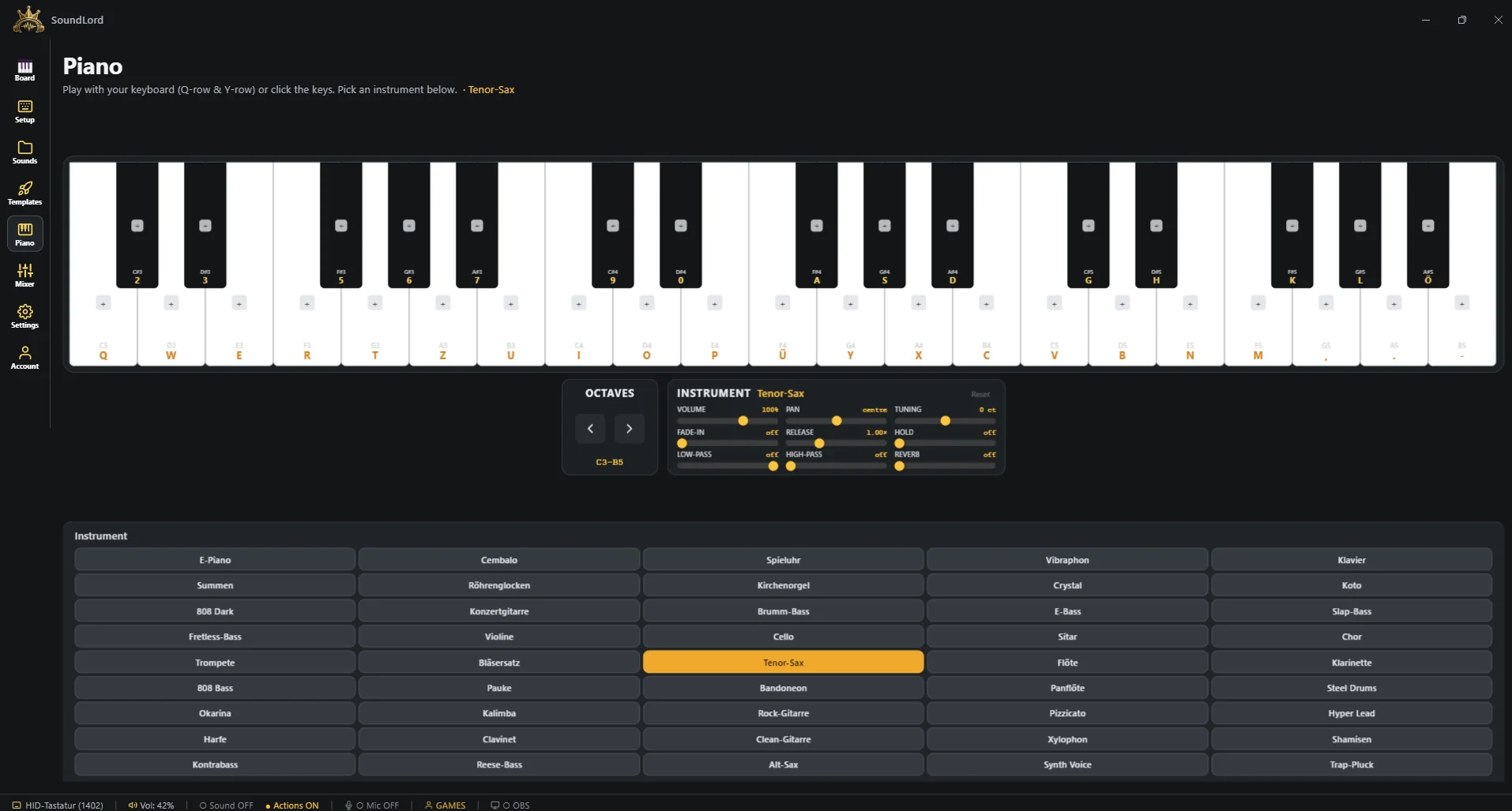
Nine settings per instrument — volume, pan, tuning, attack, release, hold, low-pass, high-pass and reverb — stored per instrument. These are recorded instruments, not synth approximations — multi-sampled and pitched per zone, so a grand piano sounds like a grand piano and not like a ringtone.
Every key can carry a library sound instead of a note, turning the piano into a second melodic soundboard.
Three octaves are a lot, but not everything. Shift the whole range up or down with the arrow keys without relearning the layout — the same letters, a different register. Bass line and melody from the same hand position.
What you play is captured into the Mixer on its own lane — improvise over your loop and the take lands in the timeline, stacking take after take instead of overwriting the last one.
A live spectrum sits under the keys and every note you hit drops a falling bar above it — you see what you played, not just hear it.
All 45 instrument packs are bundled with the installer. No account, no download queue, no "instrument store" — they work the second you open the tab, on a plane if you like.
Ten lanes on a BPM-synced grid: build loops from your sounds, your voice, your board and your piano — then render the result back onto a key. No DAW involved.
Drag sounds onto the timeline and Snap to Beat locks them to the grid. Set BPM, time signature and bar count — the loop wraps around automatically. Match the BPM of your intro song and everything sits on the beat.
Flip it on and everything you play on your soundboard lands in the timeline live — your whole board becomes the instrument, quantized into the loop.
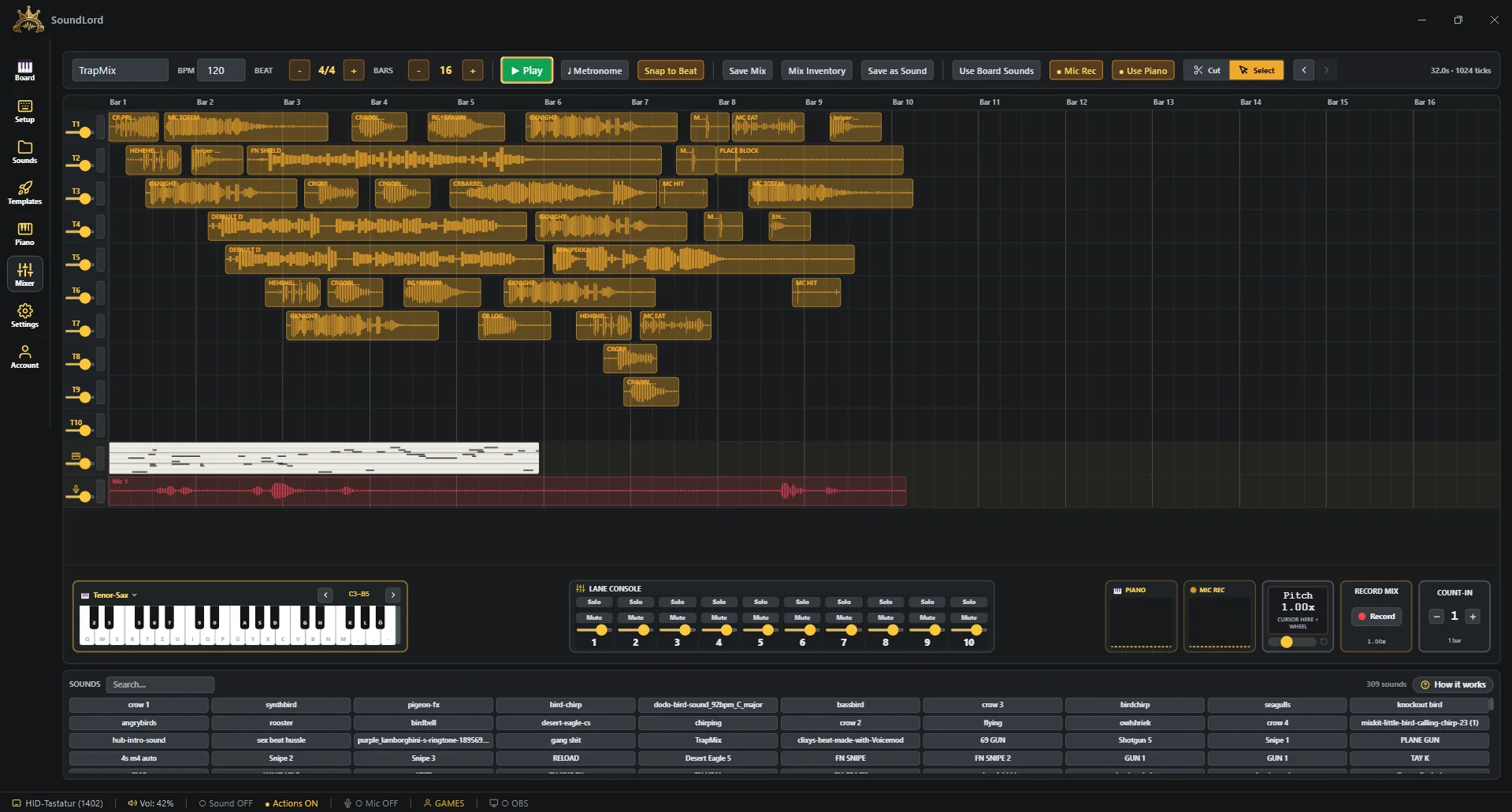
Records your voice per loop pass onto its own lane — layer vocals, beatbox or ad-libs over the beat, take by take.
Use Piano adds a dedicated lane that records what you play as notes, not as a fixed audio take. Takes stack instead of overwriting, and because they're notes you can still swap the instrument afterwards — the same phrase as a grand piano or a sax.
When the loop is right, one click renders the whole mix into a single sound you drop back onto a key — cleanly at 1.00×, or as a separate take with the pitch you are currently riding — intro jingles, hype loops, donation sounds. Mix Inventory keeps the projects themselves.
Repeat a clip across the whole loop at a fixed interval — every second beat, every bar, whatever you set. Clones can walk down free lanes like a staircase or stack on the source lane. A four-bar drum pattern from one hit, in one click.
Solo, mute and a volume fader per lane, all in one row under the timeline. Solo one lane to check a part, mute the noise, and balance the mix without touching a single clip. Every lane has its own level meter, so you see which one is actually making the noise.
A metronome count-in of up to four bars gives you time to breathe before the loop body starts, and full undo/redo plus copy & paste means nothing you build is ever one click from gone.
Double-click a piano take and it opens on a full-height chromatic grid: drag notes around, pull their length, draw new ones, clone a note across the loop at a fixed interval, set velocity per note, quantise with a strength dial, add legato or strum a chord — with snapping down to 1/16.
Park the cursor in the pitch box and roll the wheel: every lane bends up or down live, vinyl style, while clip positions, lengths and the grid stay exactly where they are. Back to 1.00× and the loop is untouched — and the render always leaves at 1.00×.
Wire SoundLord into your setup and make it look like yours — audio routing, global hotkeys, keyboard layouts and the entire look of the app live here.
Pick your output device, set the master volume, choose your recording microphone — all sound flows exactly where you want it. Headset for you, speakers for the room.
Flip on Pass Audio to Mic: with a free virtual cable, your sounds play into Discord or TeamSpeak while you talk — SoundLord guides you through the setup and confirms when it's wired correctly. A built-in noise gate keeps fan and keyboard noise out of the call, and it adds no latency of its own.
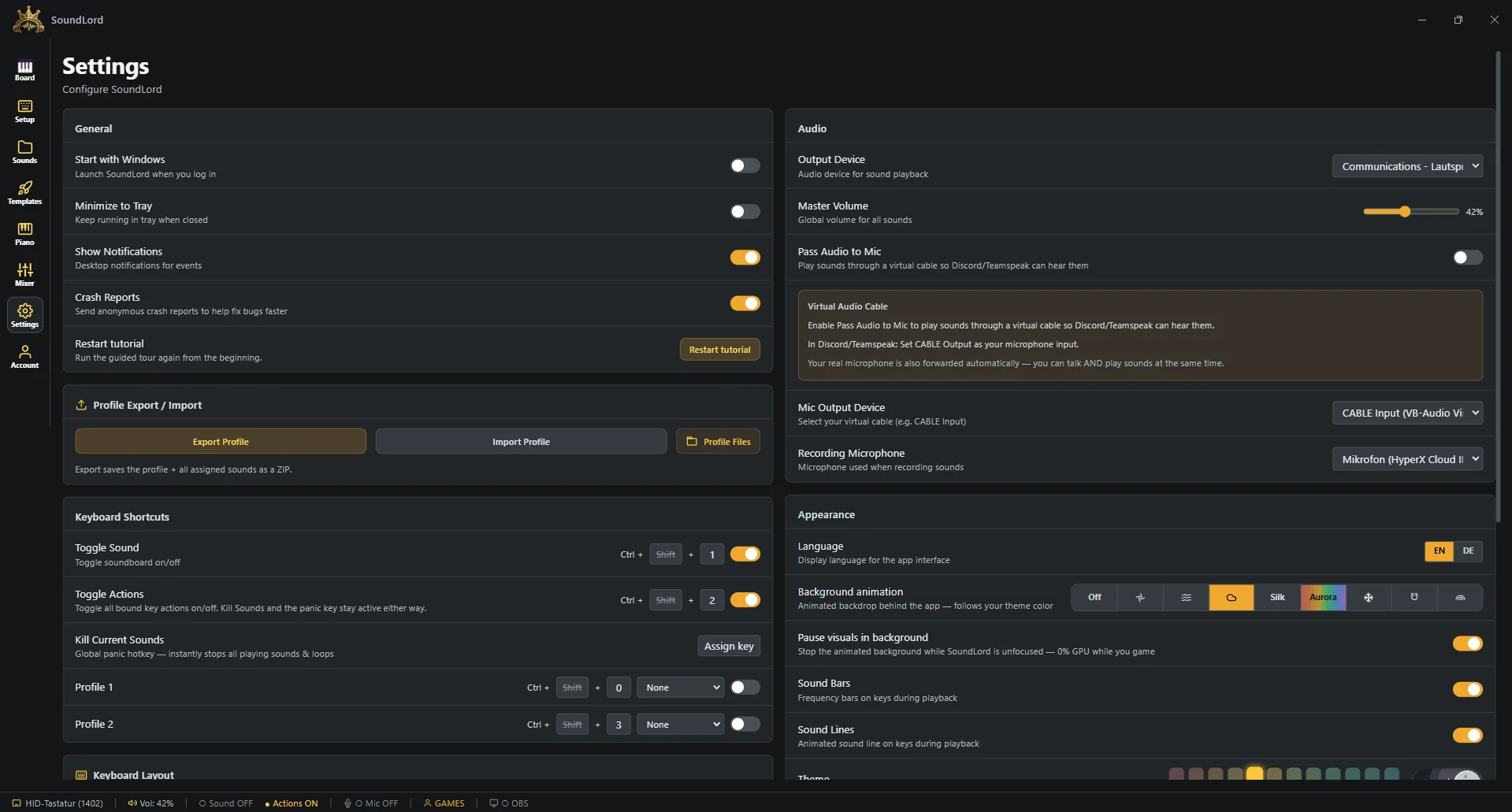
Toggle the whole soundboard on/off or jump between profiles with configurable shortcuts (Ctrl+Shift by default) — from anywhere, even mid-game, without clashing with your browser.
Match the on-screen board to your physical keyboard: DE/EN key labels and form factors from 60% to TKL. What you see is exactly the board under your hand.
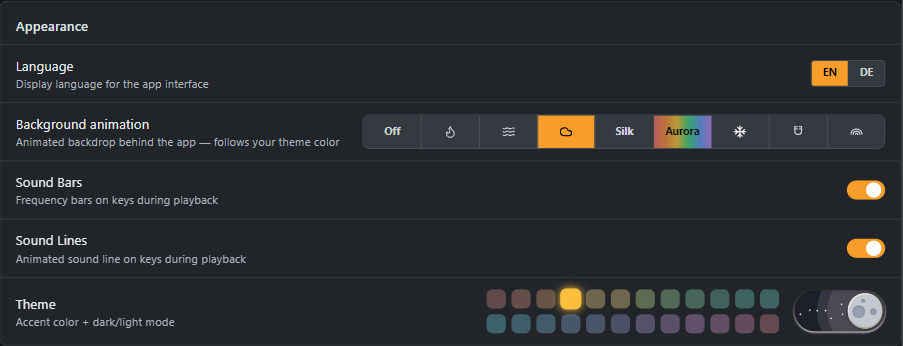
24 accent themes recolor the entire app live, 10 animated backgrounds from ASCII fire to liquid shaders run behind it, plus light & dark mode. Match SoundLord to your stream overlay.
Profiles export as a single ZIP — keys, settings and all sounds included — and import back the same way, so a full board moves to another PC in one file. Send your board to a friend, done.
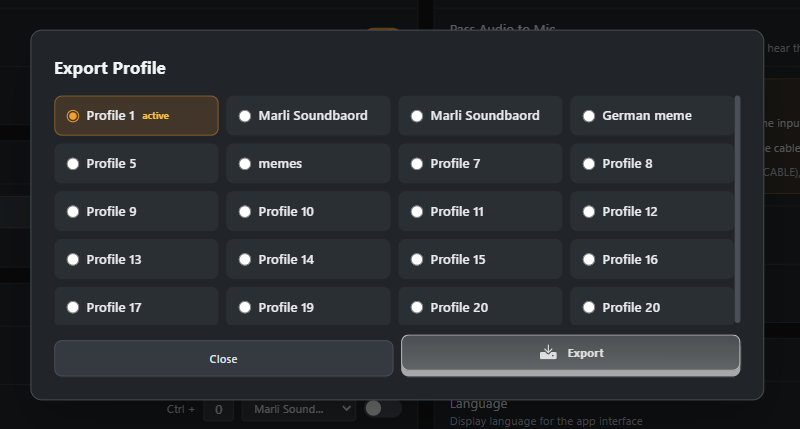
Skipped the guided tour or forgot half of it? Settings → General starts it again from step one — it walks you through each feature by letting you do it once.
Tune the audio engine to your machine — latency mode and how many voices each sound keeps ready — and run the whole app in English or German, switched live. Old laptop? One switch and it runs smooth.
Sign in and your setup stops being tied to one machine — sounds and whole profiles live in the cloud and come down anywhere, conflict-safe.
Cloud Sync uploads your sounds and whole profiles. Manage your storage right in the tab: search it, load more, delete what you don't need. A dead PC no longer takes your board with it.
On another PC, pull your board back down — keys, settings, sounds. A picker lets you tick exactly which sounds come along, so a work laptop doesn't have to carry your whole meme archive.
Not just loose files: complete profiles go up and come back down with their key mappings intact — the board you built stays the board you get, at home and at a LAN party.
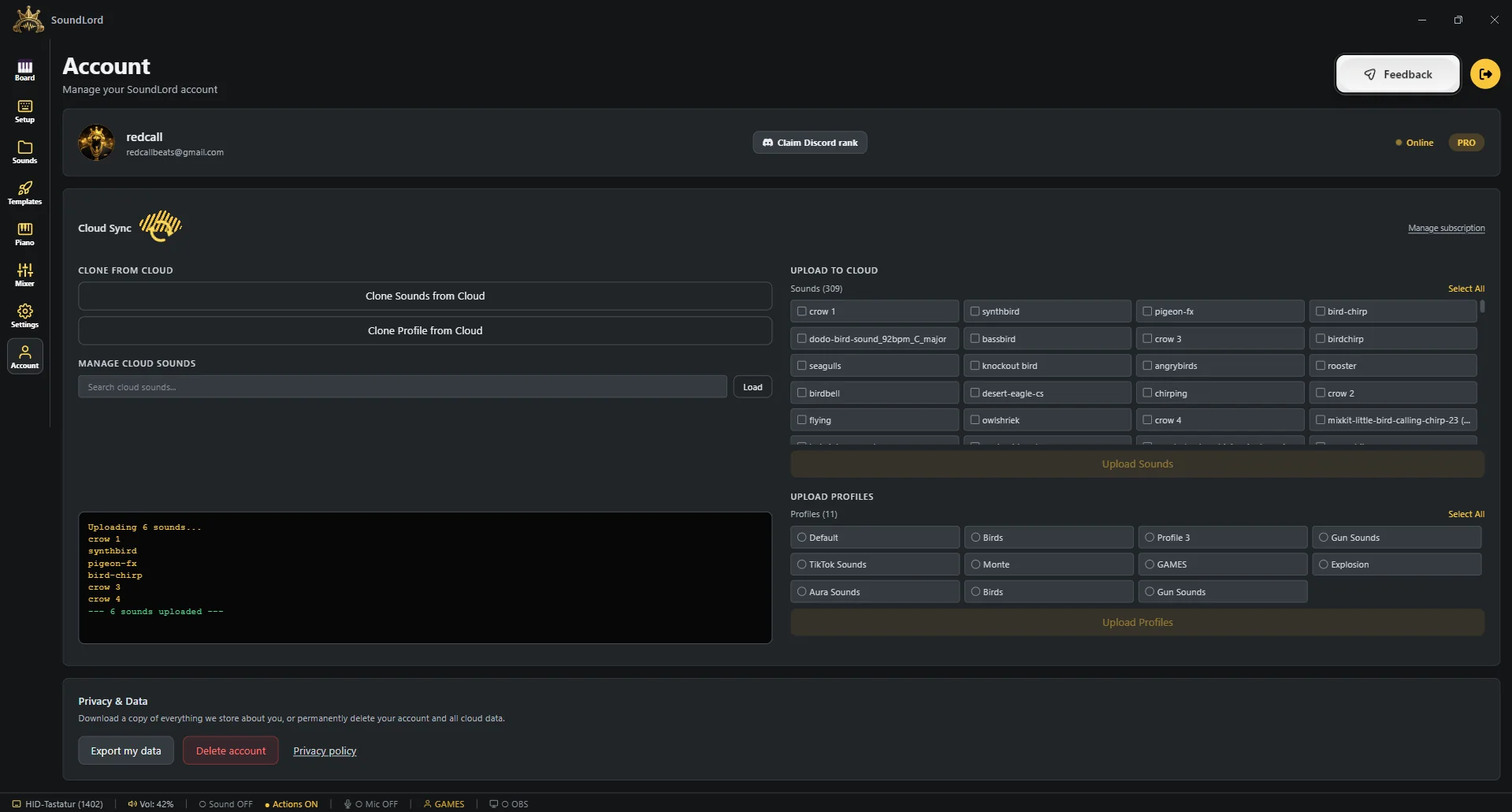
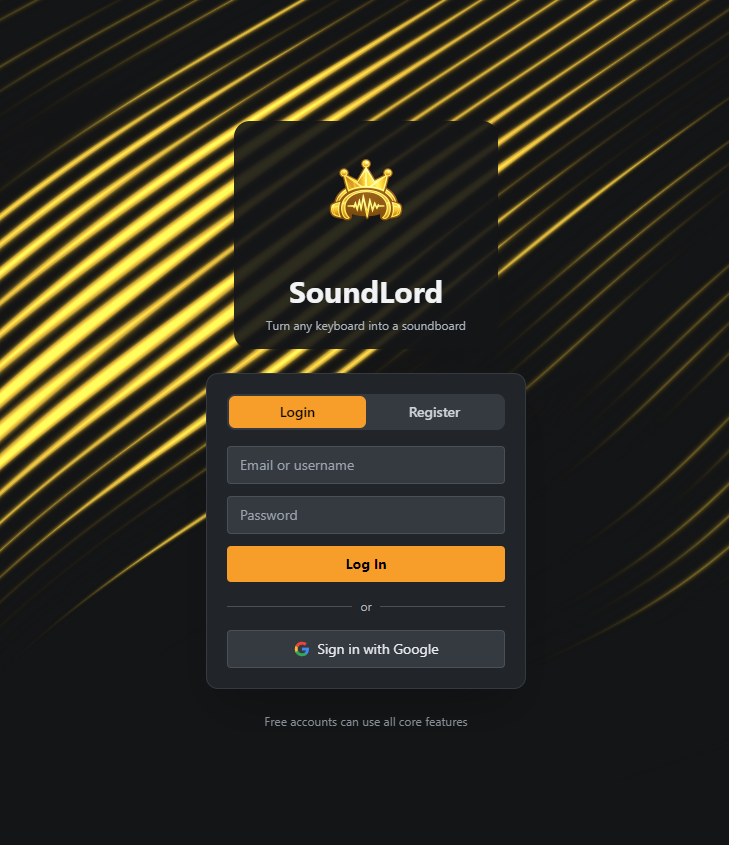
Log in with email or Google. You can even upload sounds from this website straight into your cloud library — found a clip on your phone, it's on your board tonight.
If a profile exists locally and in the cloud with differences, SoundLord shows you both versions and lets you choose — nothing gets silently overwritten.
Cloud Sync is a separate €3/month subscription with 10 GB of storage — cancel any time straight from the app, no support ticket, no dark pattern.
One button dumps everything the account holds as a JSON file. Your data belongs to you, and you can take it with you without asking anyone.
Deleting the account really deletes it — cloud files, profile data and the login itself. Type-to-confirm, then it's gone for good.
Want the step-by-step version — VB-CABLE, OBS, Discord, making your own sounds?
Show more detailed guidesSetup, features, licensing and privacy — answered. Still stuck? Jump into the Discord or use the form below.
Angaben gemäß § 5 DDG
Ludwigt Software
Inhaber: Silas Ludwigt
Enzianstraße 23
41372 Niederkrüchten, Deutschland
Kontakt
E-Mail: [email protected]
Gemäß § 19 UStG (Kleinunternehmerregelung) wird keine Umsatzsteuer berechnet und ausgewiesen.
Verantwortlich für den Inhalt nach § 18 Abs. 2 MStV
Silas Ludwigt, Anschrift wie oben.
Streitschlichtung: Wir sind nicht bereit oder verpflichtet, an Streitbeilegungsverfahren vor einer Verbraucherschlichtungsstelle teilzunehmen.
Diese AGB gelten für alle Verträge über den Erwerb von Lizenzen der Software „SoundLord“ sowie des Zusatzdienstes „Cloud Sync“ zwischen Ludwigt Software, Inhaber: Silas Ludwigt, Enzianstraße 23, 41372 Niederkrüchten (nachfolgend „Anbieter“) und Verbrauchern bzw. Unternehmern (nachfolgend „Nutzer“).
SoundLord Pro wird als Einmalkauf (Lifetime-Lizenz) für die private und gewerbliche Nutzung auf Windows-Geräten des Nutzers angeboten. Die Lizenz ist personengebunden und nicht übertragbar. Cloud Sync ist ein optionales, monatlich kündbares Abonnement mit 10 GB Online-Speicher für Sounds und Profile.
Während der Beta-Phase kann die Software Fehler enthalten. Der während der Beta erworbene Pro-Zugang bleibt auch nach Ende der Beta gültig. Der Anbieter behält sich vor, Funktionsumfang und Preise für Neukunden zu ändern.
Die Zahlung erfolgt über den Zahlungsdienstleister Stripe. Bei digitalen Inhalten erlischt das Widerrufsrecht mit Beginn der Vertragsausführung (Freischaltung der Lizenz), sofern der Nutzer ausdrücklich zugestimmt und seine Kenntnis vom Erlöschen des Widerrufsrechts bestätigt hat (§ 356 Abs. 5 BGB). Die Zustimmung wird im Bezahlvorgang eingeholt. Einzelheiten regelt die Widerrufsbelehrung.
Der Nutzer bleibt Inhaber der von ihm hochgeladenen Inhalte und sichert zu, keine Rechte Dritter zu verletzen. Unzulässig sind insbesondere rechtswidrige, beleidigende, rassistische oder gegen die Twitch-/Plattform-Richtlinien verstoßende Inhalte. Der Anbieter kann solche Inhalte entfernen und Konten bei schwerwiegenden Verstößen sperren.
Der Anbieter bemüht sich um eine hohe Verfügbarkeit des Cloud-Dienstes, schuldet jedoch keine ununterbrochene Verfügbarkeit. Die Haftung für leichte Fahrlässigkeit ist — außer bei Verletzung von Leben, Körper oder Gesundheit sowie wesentlicher Vertragspflichten — ausgeschlossen. Lokale Daten liegen in der Verantwortung des Nutzers (Backups).
Cloud Sync kann jederzeit zum Ende des laufenden Abrechnungsmonats gekündigt werden. Nach Kündigung werden Cloud-Daten nach 30 Tagen gelöscht; die lokale Bibliothek bleibt unberührt.
Es gilt deutsches Recht unter Ausschluss des UN-Kaufrechts. Sollten einzelne Bestimmungen unwirksam sein, bleibt der Vertrag im Übrigen wirksam. Stand: Juli 2026.
Verbrauchern steht ein gesetzliches Widerrufsrecht zu. Sie haben das Recht, binnen vierzehn Tagen ohne Angabe von Gründen diesen Vertrag zu widerrufen. Die Widerrufsfrist beträgt vierzehn Tage ab dem Tag des Vertragsabschlusses. Um Ihr Widerrufsrecht auszuüben, müssen Sie uns (Ludwigt Software, Inhaber: Silas Ludwigt, Enzianstraße 23, 41372 Niederkrüchten, E-Mail: [email protected]) mittels einer eindeutigen Erklärung (z. B. eine E-Mail) über Ihren Entschluss, diesen Vertrag zu widerrufen, informieren. Zur Wahrung der Widerrufsfrist reicht es aus, dass Sie die Mitteilung über die Ausübung des Widerrufsrechts vor Ablauf der Widerrufsfrist absenden.
Wenn Sie diesen Vertrag widerrufen, haben wir Ihnen alle Zahlungen, die wir von Ihnen erhalten haben, unverzüglich und spätestens binnen vierzehn Tagen ab dem Tag zurückzuzahlen, an dem die Mitteilung über Ihren Widerruf dieses Vertrags bei uns eingegangen ist. Für diese Rückzahlung verwenden wir dasselbe Zahlungsmittel, das Sie bei der ursprünglichen Transaktion eingesetzt haben; in keinem Fall werden Ihnen wegen dieser Rückzahlung Entgelte berechnet.
Bei Verträgen über die Lieferung von nicht auf einem körperlichen Datenträger befindlichen digitalen Inhalten (SoundLord-Pro-Lizenz) erlischt das Widerrufsrecht gemäß § 356 Abs. 5 BGB, wenn wir mit der Ausführung des Vertrags begonnen haben (Freischaltung der Lizenz), nachdem Sie ausdrücklich zugestimmt haben, dass wir vor Ablauf der Widerrufsfrist mit der Ausführung beginnen, und Sie Ihre Kenntnis davon bestätigt haben, dass Sie durch Ihre Zustimmung Ihr Widerrufsrecht verlieren. Diese Zustimmung und Bestätigung geben Sie im Bezahlvorgang (Stripe Checkout) ab.
Beim Cloud-Sync-Abonnement erlischt das Widerrufsrecht bei vollständiger Erbringung der Dienstleistung; haben Sie die sofortige Ausführung verlangt und widerrufen innerhalb der Frist, schulden Sie einen anteiligen Betrag für die bis zum Widerruf erbrachte Leistung (§ 357a BGB). Stand: Juli 2026.
Verantwortlich für die Datenverarbeitung auf dieser Website und in der SoundLord-App ist der im Impressum genannte Anbieter. Kontakt für Datenschutzanfragen: [email protected].
Diese Website wird über Cloudflare Pages (Cloudflare, Inc., USA) ausgeliefert. Beim Aufruf verarbeitet Cloudflare technisch notwendige Verbindungsdaten (IP-Adresse, Zeitpunkt, abgerufene Ressource) zur Bereitstellung und Absicherung des Dienstes (Art. 6 Abs. 1 lit. f DSGVO). Die Website setzt keine Tracking-Cookies und nutzt kein Google Analytics.
Für Registrierung und Login nutzen wir Google Firebase Authentication und Firestore (Google Ireland Ltd. / Google LLC, USA). Verarbeitet werden E-Mail-Adresse, Nutzername, optionales Profilbild sowie der Lizenzstatus (Rechtsgrundlage: Vertragserfüllung, Art. 6 Abs. 1 lit. b DSGVO). Bei der Übermittlung in die USA stützt sich Google auf die EU-Standardvertragsklauseln (SCC) und das EU-US Data Privacy Framework.
Nutzt du den optionalen Cloud-Sync, werden deine hochgeladenen Sounds und Profile auf Cloudflare R2 gespeichert (Art. 6 Abs. 1 lit. b DSGVO). Ohne Cloud-Sync bleiben alle Sounds ausschließlich lokal auf deinem PC — SoundLord ist local-first.
Käufe werden über Stripe (Stripe Payments Europe Ltd., Irland) abgewickelt. Zahlungsdaten (z. B. Kartendaten) werden direkt von Stripe erhoben und verarbeitet; wir erhalten keine vollständigen Zahlungsdaten, sondern nur eine Kaufbestätigung (Art. 6 Abs. 1 lit. b DSGVO). Es gilt ergänzend die Datenschutzerklärung von Stripe.
Nachrichten über das Kontaktformular werden durch Formspree, Inc. (USA) an uns weitergeleitet. Verarbeitet werden Name, E-Mail-Adresse und Nachrichteninhalt zur Bearbeitung deiner Anfrage (Art. 6 Abs. 1 lit. b bzw. f DSGVO).
Die App kann bei Abstürzen technische Fehlerberichte (Fehlermeldung, App-Version, Betriebssystem — keine Sounds, keine Inhalte) an unsere Firebase-Datenbank senden, um Fehler zu beheben (Art. 6 Abs. 1 lit. f DSGVO). Das lässt sich in den App-Einstellungen jederzeit deaktivieren (Opt-out-Schalter „Crash Reporting“).
Kontodaten speichern wir, solange dein Konto besteht. Cloud-Daten werden nach Kündigung des Cloud-Sync-Abos nach 30 Tagen gelöscht. Gesetzliche Aufbewahrungspflichten (z. B. für Rechnungsdaten) bleiben unberührt.
Du hast das Recht auf Auskunft (Art. 15), Berichtigung (Art. 16), Löschung (Art. 17), Einschränkung (Art. 18), Datenübertragbarkeit (Art. 20) und Widerspruch (Art. 21 DSGVO) sowie ein Beschwerderecht bei einer Datenschutz-Aufsichtsbehörde. Datenexport und Konto-Löschung kannst du direkt in der App ausführen (Account → „Datenschutz & Daten“) — ohne E-Mail, ohne Wartezeit. Stand: Juli 2026.